Air Enhancer AE-07 - Desert Moon Audio plug-in

Air Enhancer

$34.00
Skip to product information
Air Enhancer AE-07 - Desert Moon Audio plug-in

Air Enhancer

Air Band Equalizer

Open up the top end

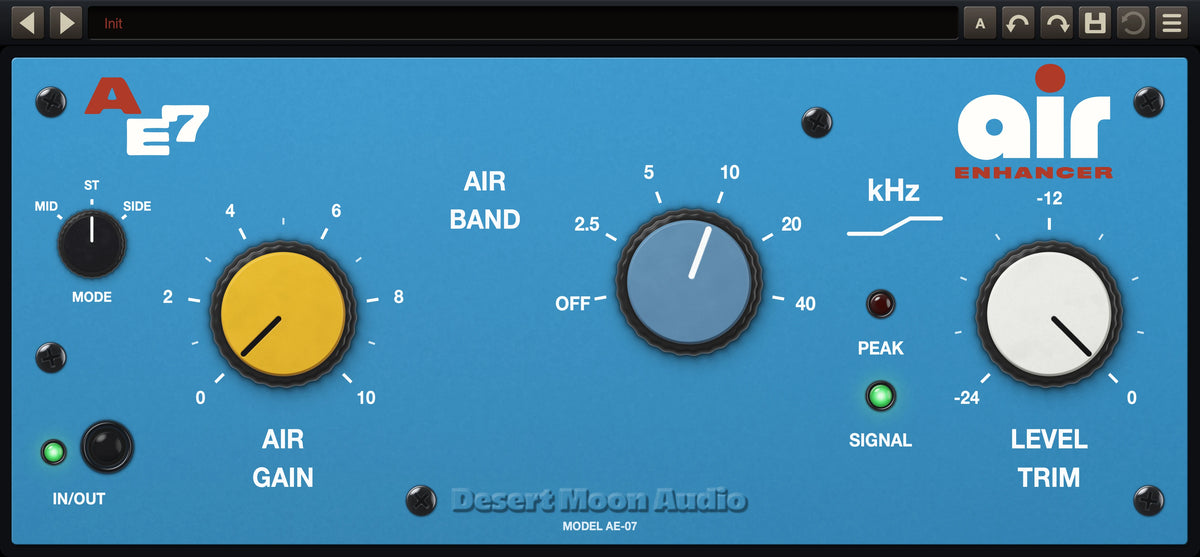
Air Enhancer is an air-band EQ plugin for Mac and PC: one very wide, very gentle high shelf that opens the top end without turning bright.

14-DAY FREE TRIAL

Full version, free for 14 days. No payment details needed.

Works with all major DAWs

AU / VST3 / AAX for Mac · VST3 / AAX for PC

Yours forever — no subscription

Instant download after purchase

Hear the difference

Press play to hear it through Air Enhancer. Tap DRY for the original, at the same moment.

Mix
Vocals
Acoustic
Overheads

Where it goes

Four of the places it lives, each with a demo above.

  • Mix bus

    Two or three dB at 20 kHz across the whole mix opens the top without a single harsh element getting harsher.

    Hear it
  • Vocals

    Air on a vocal is breath and presence, not sibilance. The shelf is too wide to find the esses.

    Hear it
  • Acoustic guitar

    Pick noise and string shimmer come forward; the body stays where it was.

    Hear it
  • Overheads

    Cymbals get sheen instead of splash, and the whole kit sounds closer.

    Hear it

About Air Enhancer

Air Enhancer does one thing: it opens up the top end. Not with a narrow peak that hunts for brightness, but with a very wide, very gentle shelf that begins a long way below the frequency printed on the panel and climbs slowly from there. That slow climb is the whole point — it is what lets you add a great deal of air before anything starts to sound bright.

The filter runs as a parallel band rather than inline. The plugin takes the difference between the filtered and unfiltered signal, rounds it off with a gentle soft clip, and adds it back — so the signal you started with passes through untouched. Everything is oversampled, which is what makes the 20 kHz and 40 kHz positions do anything at all at 44.1 or 48 kHz.

Key features

  • Air Enhancer – Air Band

    Air Band

    Six positions — Off, 2.5, 5, 10, 20 and 40 kHz. Changing position crossfades over 20 ms, so you can sweep it while audio is playing.

  • Air Enhancer – Air Gain — 0 to 10

    Air Gain — 0 to 10

    Up to +15 dB at the shelf plateau. The taper is deliberately slow at the bottom, so 0 to 3 lives in the fraction-of-a-dB range you actually want on a mix bus.

  • Air Enhancer – Mode — Mid, Stereo or Side

    Mode — Mid, Stereo or Side

    Chooses which part of the stereo image gets the air. Side opens a mix up without hyping the center; Mid targets the lead.

  • Air Enhancer – Level Trim

    Level Trim

    Cut-only output trim, −24 to 0 dB.

  • Air Enhancer – In/Out

    In/Out

    Ramps the curve flat rather than switching the signal path, so bypass is click-free and stays latency- and phase-consistent.

Air Enhancer panel, with its controls numbered

The panel at a glance

  1. Mode Mid, Stereo or Side: which part of the stereo image gets the air. Side opens a mix up without hyping the centre.
  2. Air Gain Up to +15 dB at the shelf, with a slow taper at the bottom, so 0 to 3 lives in the fraction-of-a-dB range a mix bus wants.
  3. Air Band Where the shelf sits: Off, 2.5, 5, 10, 20 or 40 kHz. Positions crossfade over 20 ms, so you can sweep it while audio plays.
  4. Peak & Signal Red warns of clipping; green shows the unit is passing audio.
  5. Level Trim Cut-only output trim, −24 to 0 dB.
  6. In / Out Latching bypass that ramps the curve flat, so switching is click-free and phase-consistent.

More details

Do I own this plugin forever?

Yes. It's a one-off purchase, not a subscription, and there's nothing to renew. Updates to a plugin you own are free — download the current installer and run it over the top.

Every plugin is sold on its own, so you can buy just the one you want. If you'd rather have all of them, the Everything Bundle collects the whole line for 30% less than buying them separately.

How many computers can I install it on?

Each license covers up to 4 computers you personally own — a studio desktop, a laptop and a couple of spares. Moving to a new computer? Choose Deactivate This Machine in the plugin's preset menu on the old one and the seat frees up instantly; if that machine is gone for good, contact us and we'll release it.

A purchase covers you, not a studio full of people. If colleagues need it, they need their own copy — that's what keeps a small company like this able to keep building plugins.

How do I get my download?

Your download link is in the order confirmation email sent at purchase, and in your account under Order history.

Your license key is in the same email. Run the installer, open the plugin, enter the key once and you're done — one key activates up to 4 of your machines.

Can't find the email? Check spam, then search for "Desert Moon Audio". If it still isn't there, get in touch with the address you ordered with and we'll resend it.

Can I run it offline?

Yes — after activation. Entering your license key needs an internet connection once; from then on it works offline — the only other time it goes online is a once-a-day check for a newer version.

If a studio machine never goes online, get in touch and we'll sort out an activation for it.

Tech specs

Mac: AU, VST3 and AAX — universal, native on Apple Silicon and Intel. macOS 10.15 or later.

Windows: VST3 and AAX, 64-bit Windows 10 or later.

DAWs: All major DAWs — Ableton Live, Pro Tools, Logic Pro, FL Studio, Cubase, Studio One, Bitwig, Reaper and Reason.

Processing: oversampled — 4x below 64 kHz, 2x below 128 kHz.

Tracking mode: low-latency filters for playing through it live — 6 samples at 44.1 kHz instead of 61. Choose it from the preset menu.

DOWNLOAD MANUAL