Palette PLT-01 - Desert Moon Audio plug-in

Palette

$64.00
Skip to product information
Palette PLT-01 - Desert Moon Audio plug-in

Palette

Multi-Effect Unit

Four modules, twenty effects, any order

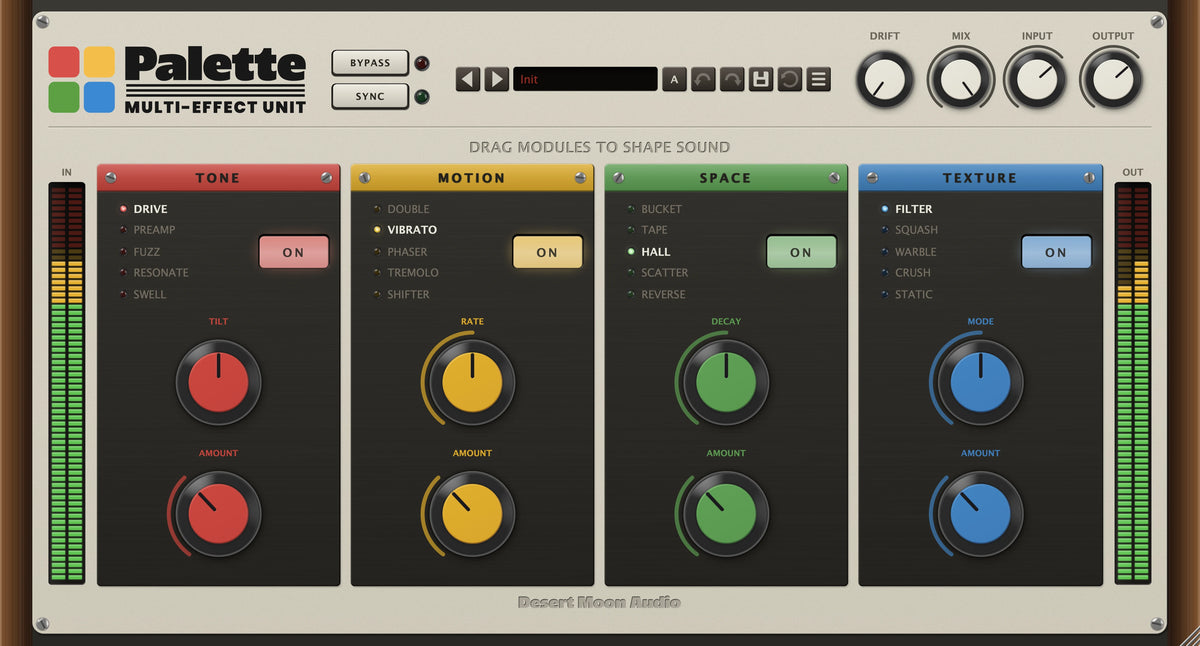
Palette is a multi-effect plugin for Mac and PC: four effect modules on one channel, five algorithms in each, in whatever order the sound wants.

14-DAY FREE TRIAL

Full version, free for 14 days. No payment details needed.

Works with all major DAWs

AU / VST3 / AAX for Mac · VST3 / AAX for PC

Yours forever — no subscription

Instant download after purchase

Hear the difference

Press play to hear it through Palette. Tap DRY for the original, at the same moment.

Drums
Organ
Solo
Bass

Where it goes

Four of the places it lives, each with a demo above.

  • Drums

    Crush in TEXTURE, then a short SPACE, and a dry kit becomes a produced one.

    Hear it
  • Organ

    Vibrato into a hall is a rotary cabinet you can set from a knob.

    Hear it
  • Solos

    Drive into delay, or delay into drive: rearrange the modules and the solo changes character.

    Hear it
  • Bass

    Fuzz, a touch of chorus and a filter, in the order the part wants.

    Hear it

About Palette

Palette is four effect modules in one plugin — Tone, Motion, Space and Texture — each holding five algorithms, and each able to sit anywhere in the chain. Twenty effects, and the order is yours to set.

That ordering is the instrument. The same four effects give completely different results depending on what feeds what: drive into delay is not the same device as delay into drive. Drag the modules around and the signal path changes with them.

Two knobs per module keep it playable rather than fiddly — an Amount and a Shape control whose meaning changes with the algorithm, with a secondary layer underneath when you want it. A global drift generator runs across the whole chain, so nothing sits perfectly still.

Key features

  • Palette – Tone

    Tone

    Drive, Preamp, Fuzz, Resonate and Swell — saturation and harmonic character, from a gentle push to something that rebuilds the signal.

  • Palette – Motion

    Motion

    Double, Vibrato, Phaser, Tremolo and Shifter — modulation, from subtle thickening to outright pitch movement.

  • Palette – Space

    Space

    Bucket, Tape, Hall, Scatter and Reverse — delay and reverb, including a bucket-brigade voice and a reverse setting.

  • Palette – Texture

    Texture

    Filter, Squash, Warble, Crush and Static — filtering, compression, and the noisier end of the box.

  • Palette – Rearrangeable modules

    Rearrangeable modules

    Drag any module to any position; the chain follows.

  • Palette – Global drift

    Global drift

    A drift generator across the whole unit, with Mix, Input and Output alongside it, so the effect can be blended rather than committed to.

Palette panel, with its controls numbered

The panel at a glance

  1. Module switch Each module has its own ON switch. Drag any module to any position and the chain follows.
  2. Algorithm list Five per module, one lit. Switching crossfades, so you can change algorithm while audio runs.
  3. Tone Drive, Preamp, Fuzz, Resonate and Swell: saturation from a gentle push to a rebuilt signal. Shape above, Amount below.
  4. Motion Double, Vibrato, Phaser, Tremolo and Shifter: from subtle thickening to outright pitch movement.
  5. Space Bucket, Tape, Hall, Scatter and Reverse: delay and reverb, including a bucket-brigade voice.
  6. Texture Filter, Squash, Warble, Crush and Static: filtering, compression and the noisier end of the box.
  7. Drift A global instability generator across the whole unit.
  8. Mix, Input, Output Blend the chain against the dry input, and set levels either side.
  9. Meters Input on the left, output on the right, so you can see what Palette did to the level.
  10. Bypass & Sync Bypass the whole unit; Sync locks delay times and rates to the host tempo.

More details

Do I own this plugin forever?

Yes. It's a one-off purchase, not a subscription, and there's nothing to renew. Updates to a plugin you own are free — download the current installer and run it over the top.

Every plugin is sold on its own, so you can buy just the one you want. If you'd rather have all of them, the Everything Bundle collects the whole line for 30% less than buying them separately.

How many computers can I install it on?

Each license covers up to 4 computers you personally own — a studio desktop, a laptop and a couple of spares. Moving to a new computer? Choose Deactivate This Machine in the plugin's preset menu on the old one and the seat frees up instantly; if that machine is gone for good, contact us and we'll release it.

A purchase covers you, not a studio full of people. If colleagues need it, they need their own copy — that's what keeps a small company like this able to keep building plugins.

How do I get my download?

Your download link is in the order confirmation email sent at purchase, and in your account under Order history.

Your license key is in the same email. Run the installer, open the plugin, enter the key once and you're done — one key activates up to 4 of your machines.

Can't find the email? Check spam, then search for "Desert Moon Audio". If it still isn't there, get in touch with the address you ordered with and we'll resend it.

Can I run it offline?

Yes — after activation. Entering your license key needs an internet connection once; from then on it works offline — the only other time it goes online is a once-a-day check for a newer version.

If a studio machine never goes online, get in touch and we'll sort out an activation for it.

Tech specs

Mac: AU, VST3 and AAX — universal, native on Apple Silicon and Intel. macOS 11 or later.

Windows: VST3 and AAX, 64-bit Windows 10 or later.

DAWs: All major DAWs — Ableton Live, Pro Tools, Logic Pro, FL Studio, Cubase, Studio One, Bitwig, Reaper and Reason.

DOWNLOAD MANUAL